Image Acquisition
Hint
The operating environment and software/hardware configuration are as follows:
- OriginCar X5 robot
- PC: Ubuntu (≥22.04) + ROS2 (≥humble)
Function Overview
Image acquisition is an essential basic function in vision development. Users can read each image frame to enable interaction between data, and can also use various traditional vision algorithms to process each frame based on the data they read. This package therefore serves two purposes: helping users acquire image data for specified frames, and helping developers learn how to use the various image data in RDK.
Running the Function
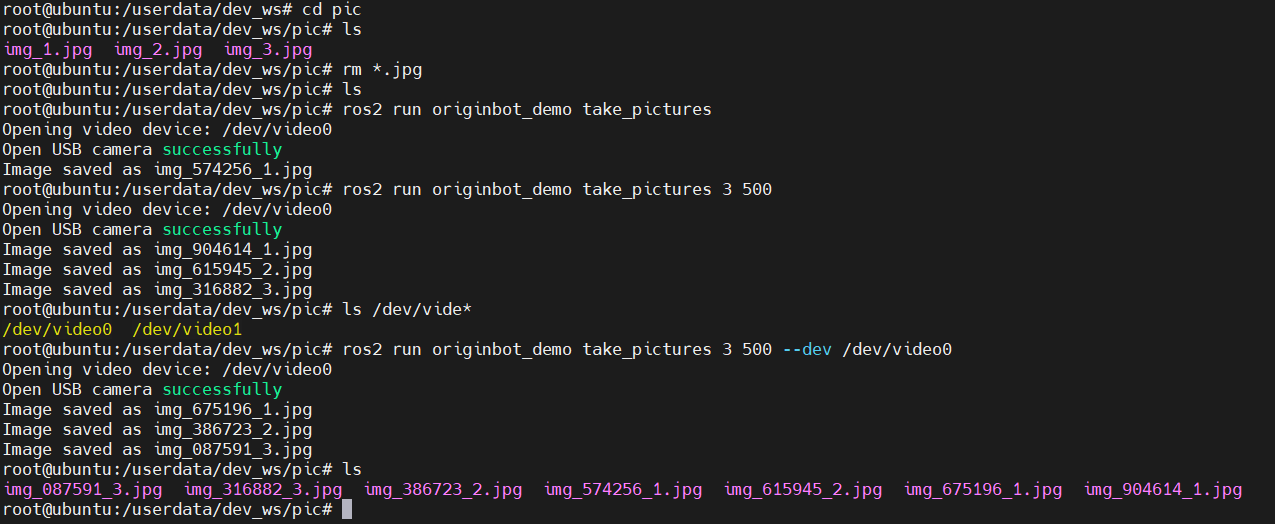
Open the video device to acquire image data. You can specify the number of images to acquire and the interval (ms); the default is 1 image with a default interval of 1000 ms, and the default video device is /dev/video0.
# Acquire images
ros2 run origincar_demo take_pictures
# Specify the number of images to acquire and the interval (ms)
# For example: acquire 3 images with an interval of 500 ms
ros2 run origincar_demo take_pictures 3 500
# Specify the camera device
ros2 run origincar_demo take_pictures 3 500 --dev /dev/video0