Code Development and Compilation Methods
OriginCar development fully follows the ROS 2 development method. This section briefly introduces the common operations on packages. For detailed ROS 2 development principles, refer to the ROS 2 Getting Started Tutorial.
Workspace
In ROS robot development, when we develop code for certain functions of a robot, the various code, parameter, script, and other files we write all need to be placed in a folder for management. In the ROS system, this folder is called the workspace.
In the official OriginCar image, the workspace has already been created. It is located in the /userdata folder and is named dev_ws, which is called the root directory of the workspace and contains five subfolders:

- src, code space: the code and scripts written later both need to be manually placed here;
- build, build space: stores the intermediate files generated during the build process;
- install, install space: holds the executables and scripts produced by the build;
- log, log space: stores the logs of various warnings, errors, and messages during building and running.
- config, configuration files: stores the model configuration files for the human tracking and gesture recognition applications (not a folder required by a ROS 2 workspace).
Of these five folders, we perform the vast majority of our operations in src. After a successful build, run the build results in install.
Building the Code
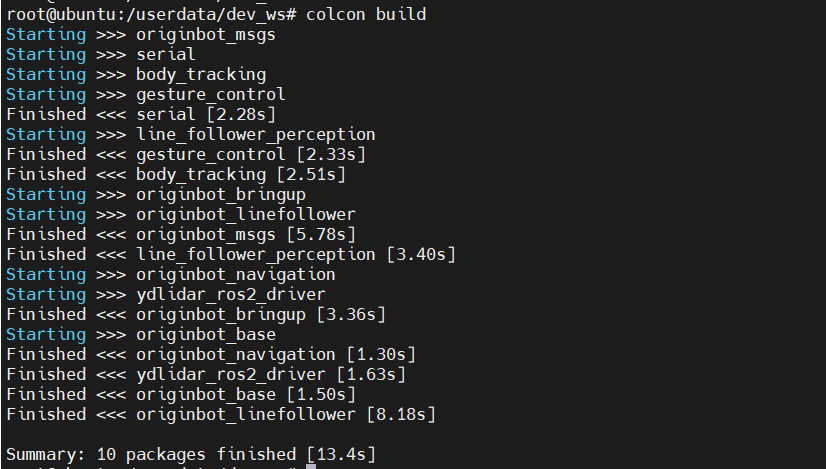
After modifying the code or configuration files in a package, you need to use the following command to build the workspace. If any dependency is missing or the code has errors, errors will be reported during the build; otherwise, no errors should appear during the build process:
Setting Environment Variables
After a successful build, to allow the system to find our packages and executables, you also need to set the environment variables:
$ source /userdata/dev_ws/install/setup.bash # Takes effect only in the current terminal
$ echo " source /userdata/dev_ws/install/setup.bash" >> ~/.bashrc # Takes effect in all terminals; run only once
Hint
In the OriginCar image, the environment variables above have already been configured in the .bashrc file. No further configuration is required.
