OriginCar S100 Custom Edition
Scope
This page covers only the OriginCar custom complete vehicle whose main controller is RDK S100. For the standard OriginCar with an RDK X3 / RDK X5 main controller, continue reading the other chapters on this site.
1. Product Overview
The OriginCar S100 Custom Edition is a custom device that replaces the main controller on the OriginCar vehicle body platform with the D-Robotics RDK S100. Apart from the main controller, its mounting and wiring harness, and the system image, the vehicle body structure, base driver, sensors, and battery solution follow the original design; the overall dimensions and appearance remain consistent with the standard edition.
The S100 uses a 6-core Arm Cortex-A78AE CPU and an 80 TOPS Nash BPU, and integrates a 4-core Cortex-R52+ MCU. It is suitable for running workloads such as visual detection, Transformer, and multi-sensor fusion at the edge. For OriginCar, the main changes brought by the new main controller are compute, memory, storage, and interface resources; chassis motion control is still handled by the original STM32 motion controller.
Core Configuration Overview
| Item | Configuration |
|---|---|
| Main controller | RDK S100 (6× Cortex-A78AE, 80 TOPS, 12GB LPDDR5, 64GB eMMC) |
| Chassis | Four-wheel chassis, dual GMR 500-line encoder motors |
| Perception | 1080P camera + Leishen N10 LiDAR |
| Wireless | Wi-Fi / Bluetooth module, dual external antennas |
| Power | 12.6V 2600mAh X2 power lithium battery |
| System | Ubuntu 22.04 (RDK OS), supports ROS 2 Humble / TogetheROS.Bot |
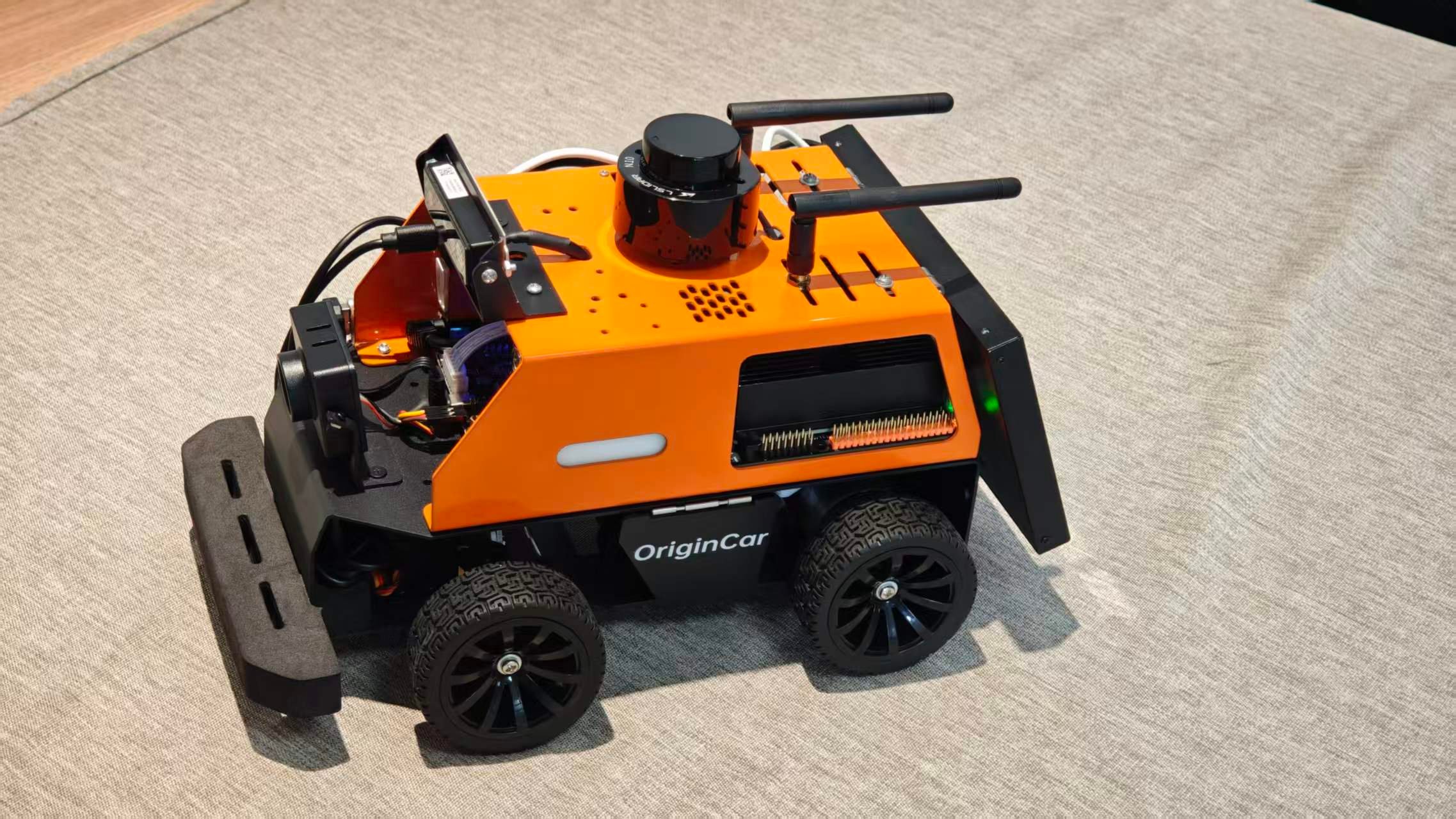
Figure 1: OriginCar S100 Custom Edition vehicle (N10 LiDAR on the roof, camera at the front, and dual external antennas at the rear)
2. Vehicle Configuration
| Category | Configuration | Description |
|---|---|---|
| Vehicle body platform | OriginCar series | Dimensions ≥276×189×150mm, weight >2.4kg; orange upper body, black chassis, front anti-collision bumper |
| Main controller | RDK S100 | 6× Arm Cortex-A78AE @1.5GHz, 80 TOPS, 12GB LPDDR5, 64GB eMMC |
| Motion control | STM32F407VET6 | Uses the original motion controller and handles the motors, encoders, and IMU |
| Drive | Hall encoder motors ×2 | Ackermann configuration, rear-wheel drive |
| IMU | MPU6050 | Onboard; used for attitude and motion feedback |
| Camera | 1080P camera | Front-mounted on a bracket, driver-free plug-and-play |
| Depth camera | Infrared depth camera | Front-mounted on a bracket; for detailed usage, see aurora930 depth camera |
| LiDAR | Leishen N10 | Roof-mounted; the ROS 2 driver is lslidar_driver |
| Wireless | Wi-Fi / Bluetooth module + dual external antennas | Connected through the S100's M.2 Key E interface |
| Battery | 12.6V 2600mAh power lithium battery | Dual-battery replacement |
| Operating system | Ubuntu 22.04 (RDK OS) | Supports ROS 2 Humble / TogetheROS.Bot |
Electrical and Electronic Architecture
| Layer | Main hardware | Responsibilities |
|---|---|---|
| Perception layer | 1080P camera, Aurora933 depth camera, N10 LiDAR | Image acquisition, 2D laser scanning |
| Compute layer | RDK S100 | Perception inference, decision-making and planning, networking and display |
| Motion layer | STM32F407VET6, dual motors, encoders, MPU6050 | Chassis motion control, odometry, and attitude feedback |
| Power layer | 12.6V power lithium battery, power distribution | Vehicle power supply and charging |
3. RDK S100 Main Controller Specifications
Model Distinction
This vehicle uses the RDK S100 (12GB memory / 80 TOPS), not the RDK S100P (24GB memory / 128 TOPS). All specifications on this page refer to the RDK S100.
| Item | RDK S100 specification |
|---|---|
| AI compute | 80 TOPS (INT8, equivalent compute) |
| CPU | 6× Arm Cortex-A78AE @1.5GHz |
| MCU | 4× Arm Cortex-R52+ @1.2GHz (1× DCLS, 1× Split-Lock) |
| BPU | 1× BPU Nash |
| GPU | Arm Mali-G78AE @100 GFLOPS |
| Memory | 12GB LPDDR5, 96-bit, up to 6400Mbps |
| Storage | 64GB eMMC; 1× M.2 Key M (PCIe 3.0×1) |
| Display | 1× HDMI 1.4, up to 2560×1440@60Hz |
| Network | 2× Gigabit RJ45; 1× M.2 Key E (Wi-Fi / Bluetooth) |
| USB | 4× USB 3.0 Type-A; 1× USB 2.0 Type-C (flashing / debugging) |
| Expansion interfaces | 40-Pin GPIO, 16-Pin MCU, Camera 100-Pin, MCU 100-Pin, JTAG |
| Power supply | 12–20V DC, 150W maximum; kit includes a 90W power adapter |
| Dimensions | 120×121×51mm (including enclosure) |
| Operating temperature | 0℃–45℃ |
| Operating system | Ubuntu 22.04 (RDK OS) |
4. Interfaces and Debugging
The main interfaces on the S100 board are as follows. The vehicle's external interfaces are routed through a custom wiring harness; the interfaces available in practice depend on the actual vehicle.
| Interface | Purpose |
|---|---|
| 4× USB 3.0 Type-A | Cameras, LiDAR, USB storage, and other peripherals |
| 1× USB 2.0 Type-C | Image flashing; serial debugging for the Main domain and MCU domain |
| 2× Gigabit RJ45 | eth0 for general networking; eth1 management port, default address 192.168.127.10 |
| HDMI | Local display and debugging |
| 40-Pin / 16-Pin | Main domain GPIO, MCU domain expansion |
| Camera 100-Pin | 3× 4-lane MIPI CSI-2 |
| M.2 Key E / Key M | Wi-Fi / Bluetooth module; NVMe SSD |
| JTAG | Main domain and MCU domain debugging |
Serial Debugging
The Type-C debug port uses a CH340 chip; when connecting for the first time, install the CH340 driver on the computer. The serial parameters are: baud rate 921600, 8 data bits, no parity, 1 stop bit, and no flow control.
5. Software and Model Adaptation
- The system is Ubuntu 22.04 (RDK OS) and can run ROS 2 Humble and TogetheROS.Bot.
- ROS 2 packages that do not depend on the BPU can be recompiled on the S100 before use; algorithms that depend on the BPU require their models to be reconverted using the S100 toolchain.
.binmodels generated on the RDK X3 / X5 cannot be loaded directly on the S100. The S100 uses the Nash BPU, so models must be compiled into.hbmmodels using the S100 toolchain.- USB / serial devices such as cameras and LiDAR have all been adapted for the S100 and can be used normally.
- It is recommended to first verify chassis motion, camera images, and the LiDAR
/scanseparately, then run the higher-level perception and navigation algorithms.
6. Usage Precautions
- Power supply range: The S100 board requires a 12–20V DC input. The vehicle battery is a 12.6V 2600mAh power lithium battery with a fully charged voltage of approximately 12.6V; the voltage decreases as the charge level drops. Before use, confirm that the power module output always remains within the range permitted by the S100.
- Cooling: The S100 has higher power consumption than the original main controller. During operation, ensure that the fan and the vehicle body ventilation holes are not blocked, and keep the ambient temperature within 0℃–45℃.
- Antennas: The dual external antennas are used for Wi-Fi / Bluetooth. Keep them as vertical as possible during use, and do not place them in close contact with motor power cables or metal structural components.
- Plugging and unplugging: Power off before connecting or disconnecting peripherals such as cameras, LiDAR, and SSDs to avoid plugging or unplugging them while powered.
- System backup: It is recommended to back up the custom system image and calibration parameters promptly. If you need to expand storage, you can install an NVMe SSD through the M.2 Key M interface.
- Model compatibility: Do not copy X3 / X5 BPU models directly to the S100; recompile them and verify accuracy.
7. Frequently Asked Questions
Q1: Can the S100 Custom Edition use the standard OriginCar system image directly?
No. The S100 uses a separate RDK OS image. The standard X3 / X5 image is incompatible with the S100's boot method and drivers, so the system must be installed according to the S100 flashing procedure.
Q2: Do algorithms that originally ran on the X3 / X5 need to be modified?
Python / ROS 2 code that does not depend on the BPU can usually be migrated directly, and ROS 2 packages only need to be recompiled on the S100; models that use BPU inference must be reconverted and quantized using the S100 toolchain.