PS2 Gamepad Teleoperation
Hint
Operating environment and configuration:
- OriginCar / OriginCar Pro
- ROS 2 Humble (Foxy also works with the matching
joyrelease) - PS2 gamepad + USB receiver
- Base driver:
origincar_base - Teleop package:
ps2_teleop
This page explains how to drive OriginCar with a PS2 gamepad. After the receiver is plugged into a USB port on the main controller, Linux exposes it as /dev/input/js0. The joy package publishes the gamepad state on /joy, and ps2_teleop maps the left stick to velocity commands on /cmd_vel.
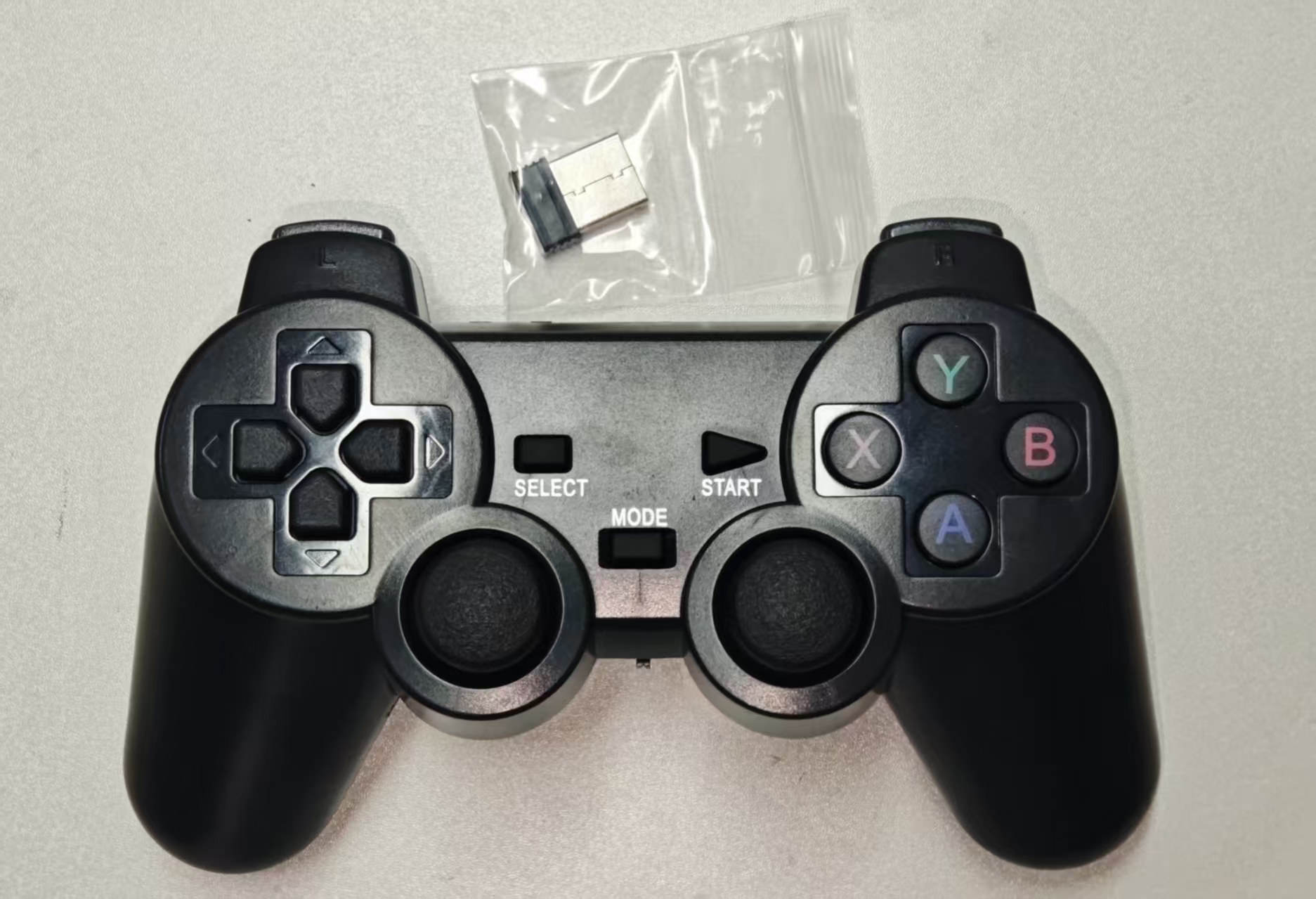
Figure 1: PS2 gamepad and USB receiver
The control chain is:
1. Connect and Identify the Gamepad
Plug the gamepad's USB receiver into a USB port on the main controller (RDK X3 / X5 / S100), power on the gamepad, and check the device:
If the output includes a device such as /dev/input/js0, the gamepad has been recognized.
If the gamepad is recognized but the sticks produce no data, press the MODE button on the gamepad to switch to analog mode. The indicator on the gamepad usually changes state.
If only js0 is present, the default device is fine for the commands below. If multiple gamepads are connected, list them with ros2 run joy joy_enumerate_devices, or specify the device when starting joy_node.
Device Permissions
The default OriginCar login is root, so no extra configuration is required. If you run as a regular user and get Permission denied, grant temporary access:
For a persistent rule:
echo 'KERNEL=="js[0-9]*", MODE="0666"' | sudo tee /etc/udev/rules.d/99-joystick.rules
sudo udevadm control --reload-rules
sudo udevadm trigger
Install the joy Driver
If joy_node is not available, install it first:
2. Install the ps2_teleop Package
Download the package:
Upload the archive to the robot's ROS 2 workspace:
Extract and build it on the robot:
cd /userdata/dev_ws/src
unzip ps2_teleop.zip

cd /userdata/dev_ws
colcon build --packages-select ps2_teleop --symlink-install
source install/setup.bash
Confirm that the node is installed:
The expected output is:
About --symlink-install
With --symlink-install, changes to config/ps2_teleop.yaml take effect after restarting the launch file; no rebuild is needed. Without this option, run colcon build again after editing the configuration.
3. Start Teleoperation
Terminal 1, start the base driver:
Terminal 2, start the gamepad node:
Once started, hold L1 and move the left stick to drive the car:
| Input | Action |
|---|---|
| Hold L1 + left stick up | Forward |
| Hold L1 + left stick down | Backward |
| Hold L1 + left stick left | Turn left |
| Hold L1 + left stick right | Turn right |
| Hold R1 + left stick | Turbo mode |
| Release L1 or center the stick | Stop |
Ackermann steering
OriginCar Pro uses Ackermann steering. Steering while stationary will not turn the vehicle; add a small amount of forward or reverse speed at the same time.
4. Button Mapping
The default mapping follows a common PS2 USB receiver:
| Gamepad input | /joy index |
Function |
|---|---|---|
| Left stick vertical | axes[1] |
Forward / backward (linear.x) |
| Left stick horizontal | axes[0] |
Turn left / right (angular.z) |
| L1 | buttons[4] |
Enable teleoperation |
| R1 | buttons[5] |
Turbo mode |
Different receiver batches may vary. Run the following command to inspect the stick and button indices:
For example, moving the left stick changes values in the axes array; pressing L1 / R1 changes the corresponding buttons entry from 0 to 1.
If the indices differ from the defaults, edit axis_linear, axis_angular, enable_button, and turbo_button in config/ps2_teleop.yaml.
5. Package Structure
ps2_teleop/
├── config/
│   └── ps2_teleop.yaml          # Axis, button, speed, and timeout parameters
├── launch/
│   └── ps2_teleop.launch.py     # Starts joy_node and the teleop node
├── ps2_teleop/
│   ├── __init__.py
│   └── ps2_teleop_node.py       # Gamepad-to-Twist mapping node
├── resource/
│   └── ps2_teleop
├── package.xml
├── setup.cfg
├── setup.py
└── README.md
The node logic is:
- Subscribe to
/joyand store the latestaxesandbuttons. - Publish
/cmd_velat 20 Hz. - Publish zero velocity when no
/joymessage arrives withintimeout. - Publish zero velocity while
enable_buttonis not held. - Read the left stick vertical / horizontal axes, apply the dead zone, direction inversion, and speed limits, and produce
linear.xandangular.z. - Use turbo speed while
turbo_buttonis held.
6. Safety Notes
- For the first test, lift the wheels off the ground and verify forward, backward, steering, and stop-on-L1-release before driving on the floor.
- Use low speeds during testing, keep bystanders clear, and prevent the car from driving off a table or hitting obstacles.
- Releasing L1, centering the stick, or a
/joytimeout makes the node publish zero velocity. However, a base-driver failure can still prevent stopping; be ready to switch off power. - Plug the receiver directly into the main controller's USB port when possible; avoid low-quality USB extension cables.
- Turn off the gamepad when not in use to avoid draining its batteries.
